


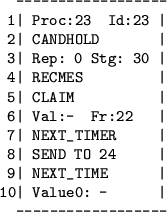
The first line contains the process number and id. The second line contains the old state of the process. The third line is available for protocol-specific information, which can be printed there by invocation of the procedure user_draw() (by the protocol). Line 4 displays the event that caused the process step. If the event is the receipt of a message ( RECMES), lines 5 through 6 present information about the message. Line 7 displays the new state of the process and line 8 the action taken by the process. Finally, lines 9 through 10 contain information about a message only if the action is the sending of this message.
If the number of the processes is at most 8, all of the processes windows are on the display during the whole execution period. Otherwise, each window is displayed when a event concerning the respective process happens. This new window takes the place of the window that has been displayed for longer without being removed from the display.